


Web application development is a crucial skill in today’s digital world. Whether you want to create an online store, a social media platform, or a productivity tool, understanding web application development is the first step. In simple terms, it involves building software applications that run on a web browser rather than a desktop or mobile device. For beginners and intermediate learners, web application development might seem complex, but with the right guidance, it becomes manageable and even exciting. In this guide, we will break down the entire process into simple steps, explain why it’s important, and provide tips to avoid common mistakes. By the end, you’ll have a clear understanding of how to approach web application development and even start building your own projects confidently.
What is Web Application Development?
Web application development is the process of creating applications that are accessed through a web browser over the internet. Unlike traditional desktop applications, web applications do not need to be installed on a user’s computer. Examples include Gmail, Facebook, and online banking platforms.
The process involves using programming languages like HTML, CSS, and JavaScript for the front-end (what users see) and server-side languages like Python, PHP, or Node.js for the back-end (the part users don’t see). Databases such as MySQL, MongoDB, or PostgreSQL store and manage the data that the application uses.
Web applications can be simple, like a contact form on a website, or complex, like an e-commerce platform with multiple payment methods, user accounts, and analytics dashboards. The main goal is to make applications accessible, user-friendly, and functional across multiple devices, including desktops, tablets, and smartphones.
Why is Web Application Development Important?
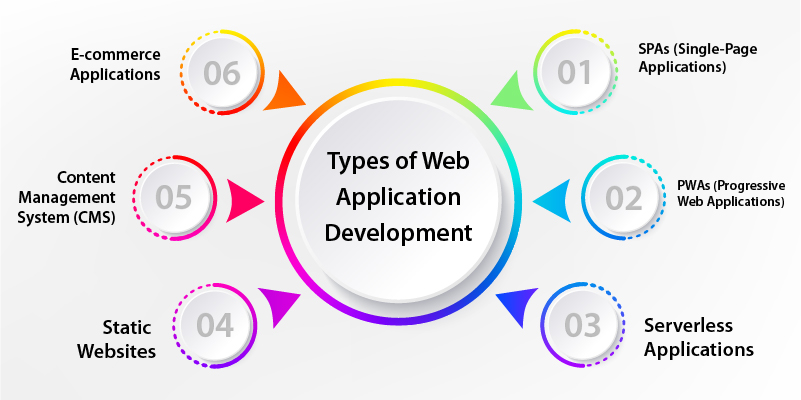
Web application development has become essential for businesses, startups, and individual developers. Here’s why:
- Global Accessibility: Users can access web applications from anywhere with an internet connection.
- Cost-Effective: No need to create separate versions for different devices. One web app works on all platforms.
- Easy Maintenance: Updates and fixes can be applied on the server, so users always have the latest version.
- Business Growth: Companies can reach a wider audience, collect user data, and improve services.
- Career Opportunities: Skilled web developers are in high demand globally.
In short, web application development allows businesses and individuals to create interactive, scalable, and user-friendly software that can grow with their needs.
Detailed Step-by-Step Guide
Step 1: Planning Your Web Application
Before writing a single line of code, planning is critical. Determine your target audience, the purpose of the application, and the features you want. Create wireframes or sketches to visualize the interface.
Step 2: Choosing the Right Technology
Decide on the front-end and back-end technologies. Common front-end choices include:
- HTML, CSS, JavaScript
- Frameworks like React, Angular, or Vue.js
Back-end options include:
- Python (Django, Flask)
- PHP (Laravel, Symfony)
- Node.js (Express.js)
Also, choose a database system that fits your needs, such as MySQL for relational data or MongoDB for flexible document storage.
Step 3: Designing the User Interface (UI)
A clean, intuitive design is key for user engagement. Focus on navigation, readability, and responsiveness. Use design tools like Figma or Adobe XD to create prototypes. Make sure your web application looks good on both desktop and mobile devices.
Step 4: Developing the Front-End
Front-end development involves turning designs into code. Use HTML for structure, CSS for styling, and JavaScript for interactivity. If using frameworks like React or Vue, you can create reusable components, making development faster and more organized.
Step 5: Developing the Back-End
Back-end development handles the application logic, database interactions, and server configuration. This includes:
- Setting up APIs to communicate between front-end and back-end
- Writing server-side logic to process user requests
- Managing user authentication and data security
Step 6: Integrating the Database
Databases store user data and application content. Integrate your chosen database with the back-end and create queries to retrieve, update, and delete data efficiently. Always ensure data integrity and optimize queries for speed.
Step 7: Testing the Application
Testing ensures the application works as expected. Perform:
- Functional Testing: Check if features work correctly
- Usability Testing: Ensure the app is user-friendly
- Performance Testing: Verify speed and responsiveness
- Security Testing: Protect against vulnerabilities like SQL injection or XSS
Step 8: Deployment
Once testing is complete, deploy the web application on a server or cloud platform such as AWS, Heroku, or DigitalOcean. Configure the domain, SSL certificates, and server settings to make your app live.
Step 9: Maintenance and Updates
Web applications require ongoing updates, bug fixes, and performance improvements. Regularly monitor user feedback and analytics to keep your application relevant and efficient.
Benefits of Web Application Development
- Accessible from any device with a browser
- Centralized updates reduce maintenance effort
- Cost-effective compared to mobile app development
- Enhances business growth and customer engagement
- Scalable to accommodate more users and features
- Provides real-time data analysis and insights
Disadvantages / Risks
- Requires continuous internet access
- Can be slower than native applications in some cases
- Security risks if not properly managed
- Browser compatibility issues may arise
- Complex functionality may require advanced coding skills
Common Mistakes to Avoid
- Skipping planning and research before development
- Overcomplicating the user interface
- Ignoring mobile responsiveness
- Neglecting security measures
- Failing to test thoroughly
- Choosing the wrong technology stack for your project
FAQs
1. What programming languages are best for web application development?
Common front-end languages include HTML, CSS, and JavaScript, while back-end languages include Python, PHP, and Node.js. Frameworks can speed up development.
2. How long does it take to develop a web application?
It depends on complexity. Simple applications can take a few weeks, while advanced platforms with multiple features may take several months.
3. Do I need to know both front-end and back-end development?
Not necessarily. You can specialize as a front-end or back-end developer, but knowing both (full-stack development) gives you more flexibility.
4. Can web applications work offline?
Some web applications use technologies like Progressive Web Apps (PWAs) to provide limited offline functionality, but most require an internet connection.
5. How can I ensure my web application is secure?
Implement HTTPS, validate inputs, encrypt sensitive data, and perform regular security testing to protect your application from attacks.
6. Are web applications better than mobile apps?
It depends on your goals. Web applications are accessible across devices and easier to maintain, while mobile apps may offer better performance and offline capabilities.
7. What are some popular tools for web application development?
Tools like Visual Studio Code, GitHub, Figma, and Postman are commonly used to write code, collaborate, design, and test applications efficiently.
Expert Tips & Bonus Points
- Start with a minimum viable product (MVP) to test your idea quickly
- Use version control systems like Git to track changes
- Optimize your web application for SEO and performance
- Regularly back up your database and application files
- Learn from existing web applications to improve your design and functionality
- Keep your code clean and modular for easier maintenance
Conclusion
Web application development is an exciting field that combines creativity and technical skills. For beginners, starting with small projects helps build confidence, while intermediate learners can explore advanced features and frameworks. By following a structured approach planning, designing, coding, testing, and maintaining you can create web applications that are functional, user-friendly, and scalable. While challenges like security risks and browser compatibility exist, they can be managed with careful planning and best practices. Ultimately, web application development is not just about writing code; it’s about solving problems, enhancing user experiences, and contributing to the digital world. Whether for personal projects, business solutions, or career growth, mastering web application development opens up endless possibilities.
